For people who run their business from their phone
Stop being the receptionist of your own business
Customers asking at 11pm, quotes left for later, callbacks you promised and forgot. Clauditor answers on WhatsApp, email and your website chat in your voice, remembers what each customer said, handles the calendar and only calls you when the matter is yours.
R$ 1,599 per month for the first 3 months, R$ 1,999 after that. Runs on your computer, with your own Claude account.
Inside the app
This is what you see on your phone, tablet and computer.
A bakery example: Marina orders a cake on WhatsApp, the agent replies with the menu price, checks the calendar and notes the pickup. You follow every step from wherever you are.
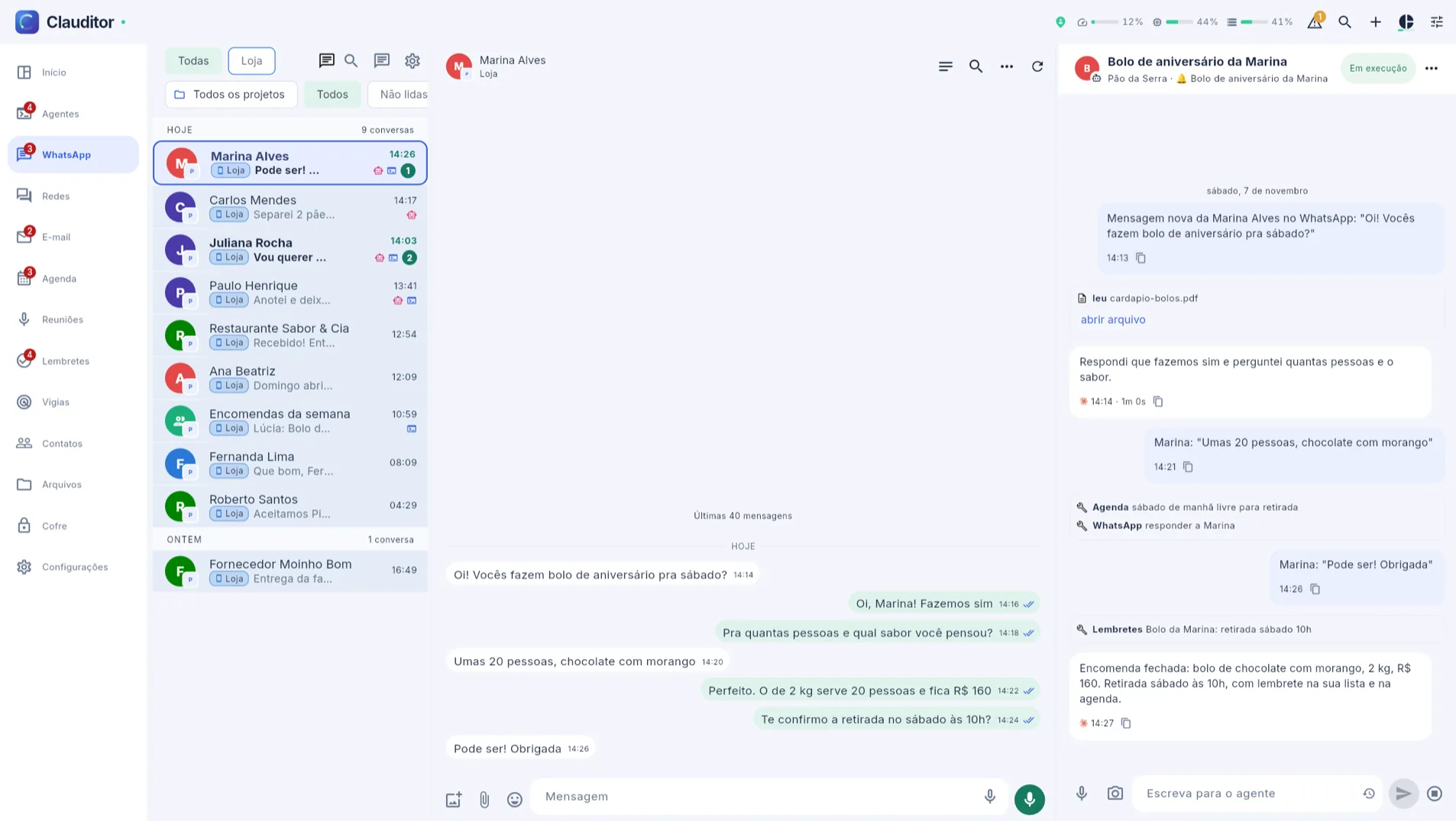
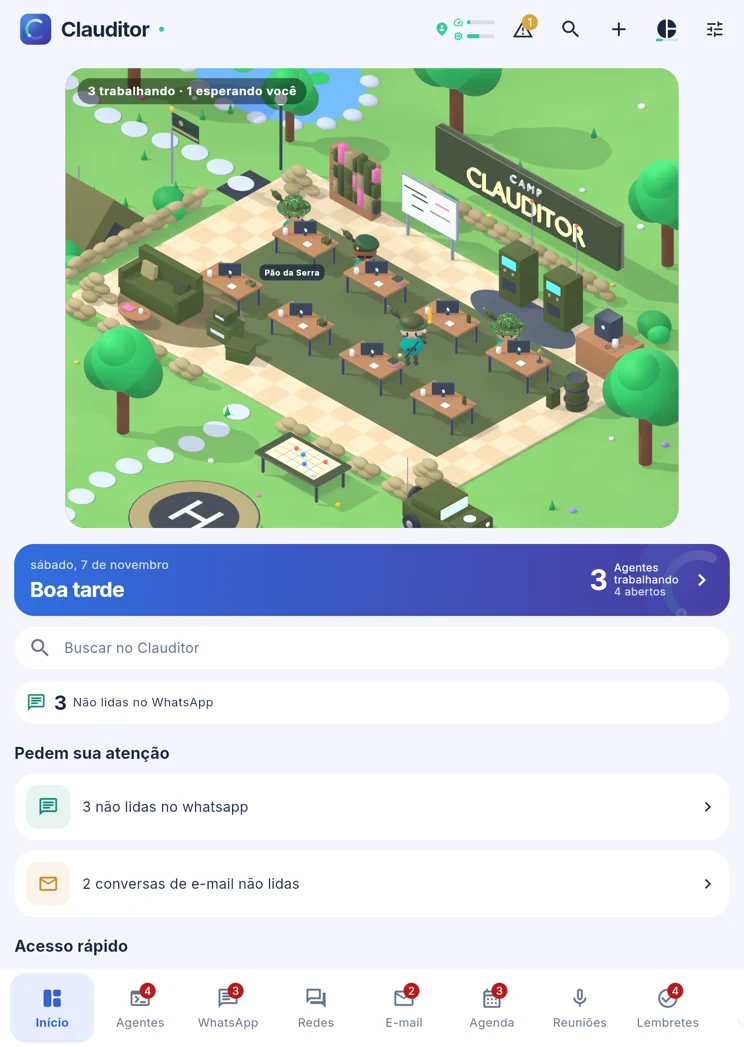

- ComputerThe conversation on one side and the agent at work on the other: what it read, what it replied and the reminder it created.
- TabletThe home screen shows who is working, what is waiting for you and what is still unread.
- PhoneThe same conversation in your pocket, with the replies sent on your behalf.
Real app screens with sample data.
Watch the agents at work
Work gets done. You can follow along.
They walk to their desk, handle a request and get ready for the next one. In your dashboard, each agent shows what it is actually doing.

Double-tap the room to zoom in. Choose an activity to explore the example.
The scene could not load. You can still explore the examples below.
While you were asleep
An ordinary night with Clauditor
You put the phone down at 10 pm. The business stays open.
- replied
Answered Marina about Saturday hours and sent the address.
- noted
Noted on Paulo's contact: deposit paid, balance due on the 12th.
- drafted
A supplier email asked for a deadline. Left the reply ready for your approval.
- replied
A website visitor asked for prices. Answered with your price list.
- reminder
Created a reminder: call Joana on Tuesday, as she asked.
- briefing
Sent your morning briefing: 3 conversations need you, 9 already handled.
Illustrative example of a working night.
What it solves
If any of these is your day, it was built for you
A customer asks at 11 pm and only hears back the next day, after buying elsewhere.
It answers right away, in your writing style, within the hours you allow.
WhatsApp here, email there, the website chat somewhere else.
Everything lands in one inbox, with each person recognized across channels.
You promised to get back to someone and forgot.
It records the promise with a due date and reminds you, or handles it when due if you let it.
The customer went quiet in the middle of a deal.
It notices who went cold and drafts the follow-up.
Your schedule lives in three places and nobody knows what is on today.
Calendar, reminders and birthdays in one place, plus a briefing in the morning, afternoon and evening.
Your team replies without knowing what was already said.
Every agent sees the history, the notes and who said what before answering.
What it replaces
A whole team for less than one employee costs
Add up what you pay today, in people and in tools, to answer, remember and follow up with customers.
WhatsApp, email and website chat attendant
Answers on every channel, day and night, in your tone.
Secretary
Handles the calendar, reminders and birthdays, and sends you a daily summary.
A notebook for each customer
Keeps what each person said, what they paid and what was promised.
Whoever chases customers who went quiet
Notices who went cold and drafts the follow-up.
Personal assistant
Ask in plain words and it finds the contact, builds the quote and creates the reminder.
Scheduling tool
A public page where customers book on their own, only in your free slots.
ManyChat-style Instagram automation
Coming soon: whoever comments the keyword gets the link in their DMs.
One place for everything that comes in
Every channel comes in. Replies, notes and reminders go out.
Connect the number and the inbox you already use. No new WhatsApp number, no new email: Clauditor works behind them.
Answers the way you would
On the other side, nobody can tell it is an assistant
It reads like a person, waits as long as someone typing would, and writes short. You decide how much it decides alone.
In your voice
It learns how you write to each customer and matches the tone, from formal to casual.
On your hours
It respects the window you set. Outside it, the reply waits for opening time.
Human pace
Seen, typing, short sentences with pauses between them. No wall of text in one second.
A draft when it is yours
If the conversation is yours, it leaves the reply ready in the box, waiting for you to hit send.
Three intelligence levels
Light for everyday questions, Moderate for subtler talks and Ultra for real reasoning.
Open backstage
Every conversation shows what it did and why. Pause it, correct it or give it direction anytime.
Assistant
Calendar, reminders and a summary of your day, three times a day
It takes care of what usually gets forgotten and reaches out at the right time, in your time zone.
Weekly calendar
Drag to reschedule. Syncs with Google Calendar, iCloud and any CalDAV.
Reminders that act
When due, the reminder alerts you or, if you choose, the agent handles it.
Morning, afternoon and evening briefing
What needs you, what moved and what is pending, by email, dashboard or your own WhatsApp.
Birthdays
It knows whose birthday it is and drafts the message for your approval.
Booking page
A public link where customers book on their own, only in free slots.
Send later and snooze
Write now and schedule it. Push a conversation away until the right time.
Memory and notes
It writes down what each person said, so nobody starts from zero
The scribe reads conversations that went quiet and keeps facts, lessons and promises with due dates. On the next message, the conversation picks up where it left off.
Memory per contact
Preferences, history and agreements for each customer, always at hand.
Business lessons
What it learns in one conversation applies to the next ones, in the right profile.
Long conversations, nothing forgotten
Conversations with hundreds of messages get a running summary.
Files it reads
Price lists, menus, contracts and FAQs become answers. PDFs and images included.
Just ask
Anything you can do by clicking, you can ask for in plain words
The lamp sits next to every screen. Ask the way you would ask an assistant and it gets done, showing you what will go out first.
Tasks with your agent
Your own chat with the agent, with web search when the request needs it.
Recurring automations
Every Monday at 9 am, a summary of customers without a reply. Written your way.
Nothing goes out without you
It prepares, you confirm with one click. Only genie mode, which you turn on, sends directly.
Connect other tools
MCP connections and any OpenAPI service become actions it can use.
Organization
Contacts, team and files in the same place
Each person is one person, no matter where they wrote from. Each profile has its own voice. Each agent sees only what they need.
Unified person
WhatsApp, email and website of the same person together, with their notes and files.
Profiles
Personal, business 1, business 2. Each with its own instructions, tone and library.
Swipe triage
First-time contacts show up as a deck: one gesture sends them to the right profile.
Team
Owner and agents, email invites and the name of who sent each message.
Search everything
⌘K finds conversations, messages, people, files, tasks and reminders in one field.
Your Clauditor status
Green, yellow or red for each channel, with the fix button right next to it.
Wherever you are
On your computer and your phone
Phone app
iPhone and Android, unlocked by an invite to your account email, with the bottom bar your way.
Alerts with the app closed
New message, channel down, balance and briefing, with quiet hours.
Mac and Windows app
Clauditor runs and opens on your computer once installed; on a Mac it also brings SMS, iMessage and Reminders.
Three languages
The interface speaks Portuguese, English and Spanish.
Integrations
Works with what you already use
- Live
WhatsApp
Your own number, paired by QR. Voice and video become text.
- Live
Email
Gmail, your domain email and any IMAP and SMTP inbox.
- Live
Website chat
A chat bubble on your site with one line of code.
- Live
SMS and iMessage
From your iPhone, through the Mac companion.
- Live
Google Contacts and Calendar
Two-way sync.
- Live
iCloud, CardDAV and CalDAV
Fastmail, Nextcloud and similar.
- Live
Mac Reminders
Through the companion, both ways.
- Live
MCP and OpenAPI
Plug other services in as agent tools.
- Coming soon
Instagram and Messenger
Direct messages and comments in the same inbox, and whoever comments the keyword gets the link in their DMs.
- Coming soon
Microsoft calendar and contacts
Outlook and Microsoft 365.
Pricing
One subscription. All of Clauditor working on your computer.
No credit packs and no per-message counting: Clauditor runs on your computer with your own Claude account, and you use it all in the app, on your computer and your phone.
Clauditor
R$ 1,599/mo
for the first 3 months
Then R$ 1,999 per month.
Create accountOnce you subscribe, you download the connector and the app opens on its own.
What is included
- Replies on WhatsApp, email and your website chat, in your voice
- Memory for every contact, calendar, reminders and a daily briefing
- Team, profiles and the lamp to ask in plain words
- Automatic encrypted backup every day: only you hold the key
What you need
- A Mac or Windows computer that stays on, where the connector runs in the background
- A Claude account, paid directly to Anthropic. ChatGPT, Gemini and others are optional
Prices in Brazilian reais (BRL), billed monthly.
Your data
Built to keep what is yours
LGPD compliant
Export everything to a file or delete your account from the app, with 7 days to change your mind.
Encrypted credentials
Email passwords and WhatsApp sessions are encrypted. Your login password is never stored in plain text.
Two-step verification
With an authenticator app and recovery codes.
Your data is not for sale
No ads. In the app, only the cookies that make it work; on this site, visit statistics only if you accept.
See the full privacy and data page
Google user data: when you sign in with Google or connect your calendar and contacts, Clauditor uses that data only to show and sync your calendar and contacts inside your account. Never for advertising, never to train AI models and never to generate images, in line with the Google API Services User Data Policy, including the Limited Use requirements. Privacy
FAQ
Frequently asked questions
I just signed up. Where do I start?
With the subscription, which shows up right after sign-up. Once paid, you download the connector on your computer (Mac or Windows), sign in to your Claude account and the app opens on its own. From there: describe what you do in one sentence, connect WhatsApp with the QR code and choose which conversations the agent answers on its own.
Do I need a new WhatsApp number?
No. You connect the number you already use by scanning a QR code, just like WhatsApp Web.
Does it always reply on its own?
Only where you allow it. Turn the agent on per conversation or by rule and set the hours. Everywhere else it drafts and waits for you.
How much does it cost in practice?
R$ 1,599 per month for the first 3 months and R$ 1,999 after, with no per-message counting. The Claude account that Clauditor uses on your computer is paid directly to Anthropic.
Do I need an AI account or technical skills?
You need a Claude account; ChatGPT, Gemini and others are optional. No technical skills: the installer puts the connector on your computer, helps you sign in and then it runs in the background, with just an icon by the clock.
Does the new Meta per-message WhatsApp fee add to the price?
No. Clauditor connects your number by QR code, like WhatsApp Web, not through Meta's paid API, so the per-message fee Meta charges businesses on the API never reaches you.
What if my computer turns off?
The app pauses until the connector checks in again. Nothing is deleted; turn the computer back on and everything resumes.
Does it work with my team?
Yes. Invite agents by email. They handle conversations; settings, subscription and channels stay with the owner.
Does it work on my phone?
Yes. There is an iPhone and Android app, unlocked by an invite to your account email, with alerts even when the app is closed.
Which languages?
The interface is in Portuguese, English and Spanish, and the agent replies in the language the customer wrote in.
Still have a question? Talk to us.
Write here and the answer arrives in your inbox.
Your business stays open even after you put the phone down
Create your account, subscribe, install the connector on your computer and watch the first conversation get handled.